Low-Level GenAI APIs Too Heavy - A Higher-Level .NET Path to Plug Local Small Models into Agents
Background
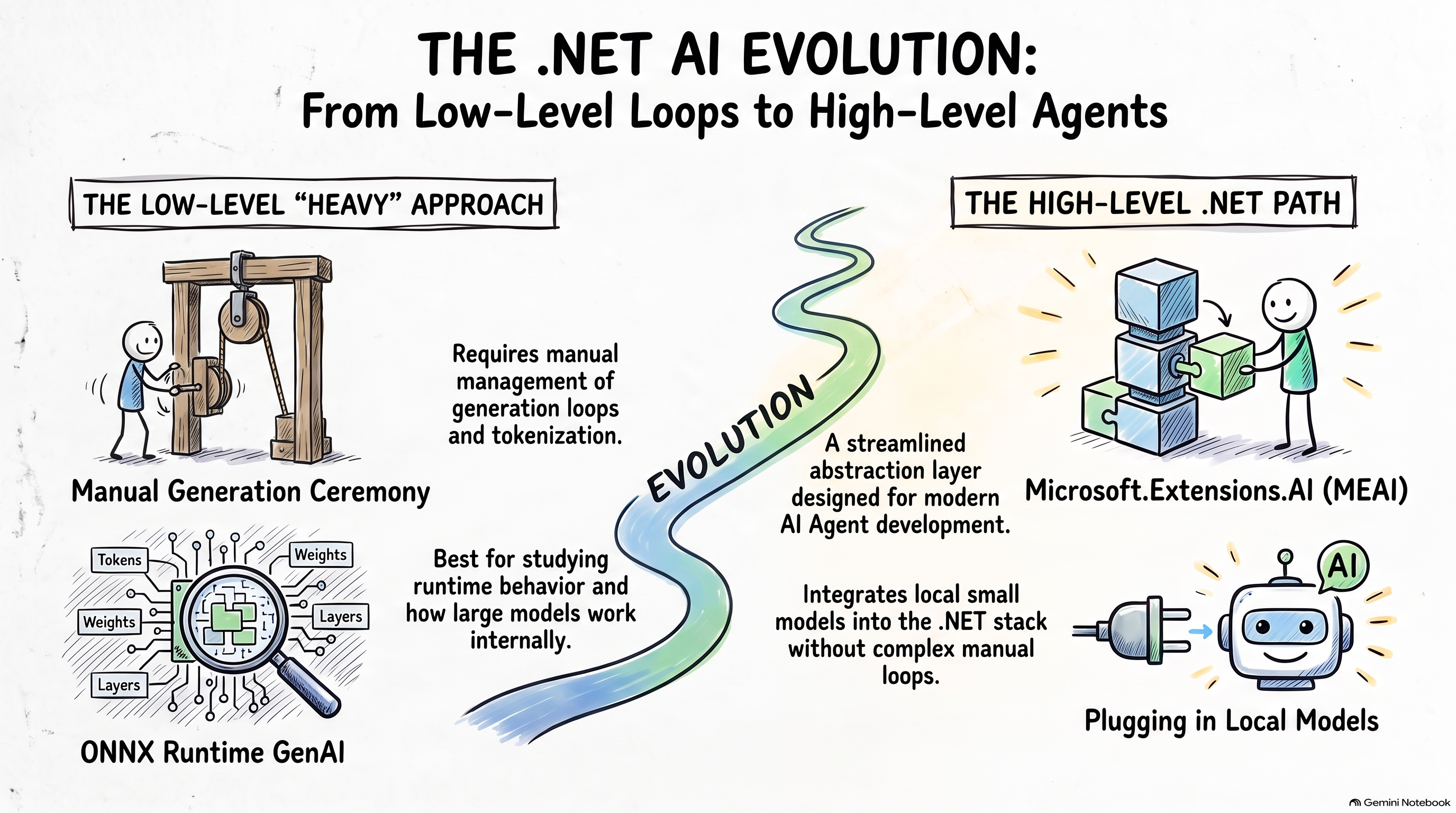
In my previous article, I walked through how to load a small language model locally and build an AI app on top of the cross-platform ONNX model standard. That post focused on the low-level APIs exposed by ONNX Runtime GenAI — great for studying and practicing how large models work under the hood, but a bit too low-level for day-to-day Agent development.
In this article, I will share what I learned about how the .NET ecosystem supports AI Agents today, and how you can plug ONNX into that stack without staying at the Generator / tokenizer loop level. After reading this post, you should understand where Microsoft.Extensions.AI (MEAI) fits, how OnnxRuntimeGenAIChatClient simplifies local chat, and how to take one more step with Microsoft Agent Framework (MAF) for a minimal on-device Agent.
If you have already been through the low-level ONNX GenAI walkthrough, this post is the natural next step. Let’s get started.
 ## Microsoft.Extensions.AI (MEAI)
First, the Microsoft.ML.OnnxRuntimeGenAI package exposes a higher-level type: OnnxRuntimeGenAIChatClient. With it, we can talk to a local small model much more easily and skip most of the low-level GenAI API details.
If you look at the implementation, OnnxRuntimeGenAIChatClient is built on the IChatClient interface — and that leads us to an important piece of the .NET AI stack: Microsoft.Extensions.AI (MEAI).
MEAI is a set of core .NET libraries that provide a unified layer of C# abstractions for AI services: small and large language models, embeddings, middleware, and more. Low-level APIs such as IChatClient were extracted from Semantic Kernel and are now part of MEAI. The goal is to act as a unifying layer in the .NET ecosystem so you can pick your preferred frameworks while still sharing the same core concepts across libraries.
Next, let’s see what an app looks like when we combine MEAI with ONNX Runtime GenAI:
1 | using Microsoft.Extensions.AI; |
As you can see, besides OnnxRuntimeGenAIChatClient, we also use types such as ChatMessage and ChatOptions from Microsoft.Extensions.AI. Generation options like num_beams and do_sample can be passed through AdditionalProperties when you need GenAI-specific knobs — handy, right?
One more distinction worth keeping in mind: MEAI alone is not an Agent framework. You can build one-shot calls, chat, or even tool-call loops on top of MEAI without the system becoming fully “agentic.” When you need goal-directed, multi-step orchestration, that is when you reach for Microsoft Agent Framework (MAF) instead.
In the following section, let’s take that next step and wire a local ONNX small model into a minimal edge Agent.
Microsoft Agent Framework (MAF)
The jump from chat client to Agent is surprisingly small: with the AsAIAgent extension on IChatClient, you can promote a chatbot into an AIAgent with instructions and a name.
1 | using Microsoft.Agents.AI; |
Same model path, same ONNX runtime underneath — but now you are in MAF’s Agent surface area for orchestration and tooling as your scenarios grow.
Summary
In this post, we connected three layers:
- ONNX Runtime GenAI — local inference for small models on device
- MEAI (
IChatClient,ChatMessage,ChatOptions) — a clean, shared abstraction for model interaction in .NET - MAF (
AsAIAgent) — when chat is not enough and you need Agent-style orchestration
Based on the two examples above, I put together a map of the ONNX-related .NET ecosystem you can refer to when you design your own edge AI or Agent projects:
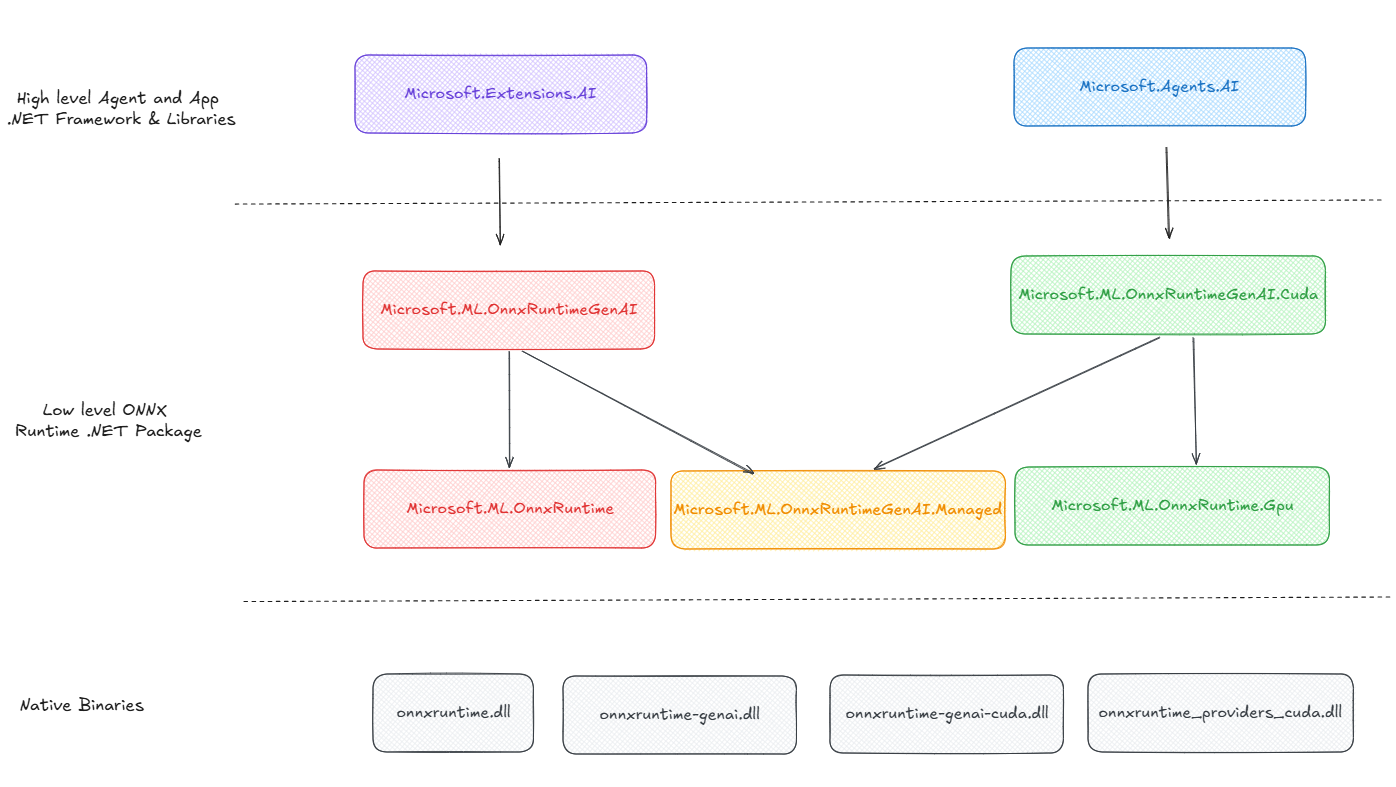
As we mentioned above, the low-level GenAI APIs are still the best classroom for understanding transformers and autoregressive loops. For product-style Agent work on .NET, this higher-level path is the one I reach for first.