MCP Adaptation to OAuth 2.0 PRM - A Lightweight API Gateway-Based Approach
Background
Compared with today’s AI agents, traditional applications tend to operate in a relatively static world. The resources a user needs through an app are usually known in advance. From an access-control perspective, that makes life much easier.
AI agents are different. Because they make decisions dynamically, the scope of what they might touch is open-ended. An agent may need resources that were never hard-coded into the application.
As a resource owner, you also need a better protocol so agents can access your APIs with permission and in a secure way, right?
That brings us to today’s topic: a new member of the OAuth 2.0 family—Protected Resource Metadata (PRM)—and how it addresses the problems above.
Beyond the theory, I will also walk you through a Gateway-based implementation that stays light on your MCP service and scales well as you add more resources. Let’s dive in.
The Cross–Trust-Domain Permission Problem
Most OAuth 2.0 extensions give you a reasonable hint from their names. PRM—Protected Resource Metadata—sounds abstract, but its behavior is actually straightforward.
Its main job is the problem we opened with: how does a client get permission to access a resource that lives outside its original trust domain?
Let’s quickly revisit the classic OAuth 2.0 architecture. It has four core roles: the user (resource owner), the client application, the protected resource, and the authorization server.
The authorization server is the anchor. It defines a trust domain: inside that domain, the authorization server decides who may access what.
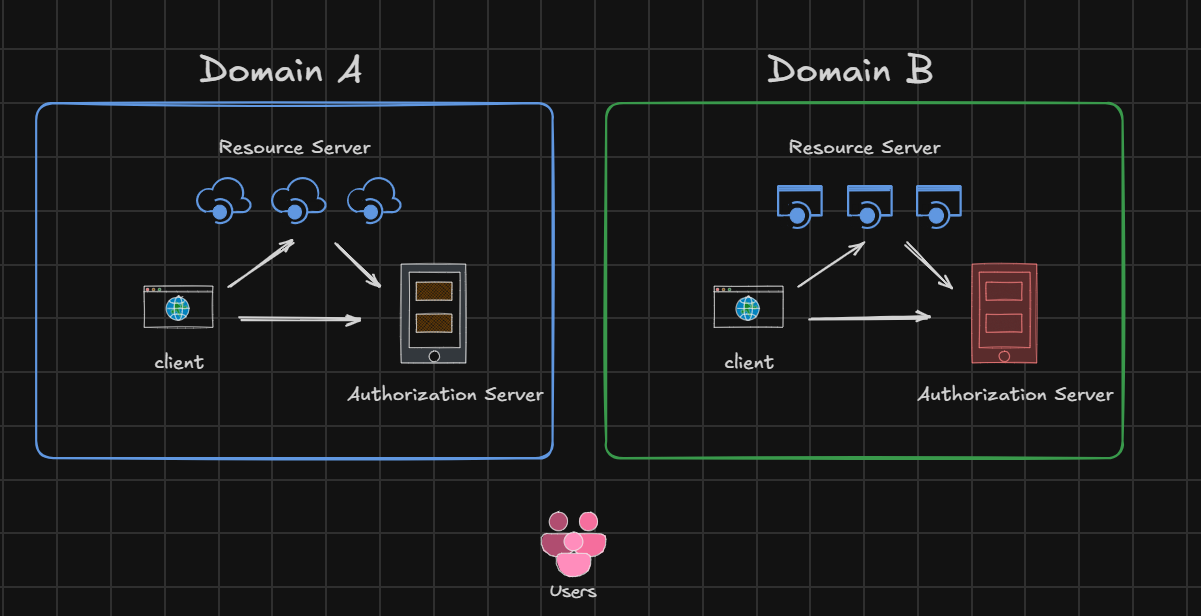
In a traditional app, things inside that domain are mostly fixed. A user delegates an app to access a resource, and both the app and the resource are governed by the same authorization server. No drama.
In an AI agent setting, you can easily run into cross–trust-domain access: the agent presents a token issued in one domain and tries to call a resource in another. That will not work.
Next, let’s see how PRM helps.
OAuth 2.0 Protected Resource Metadata
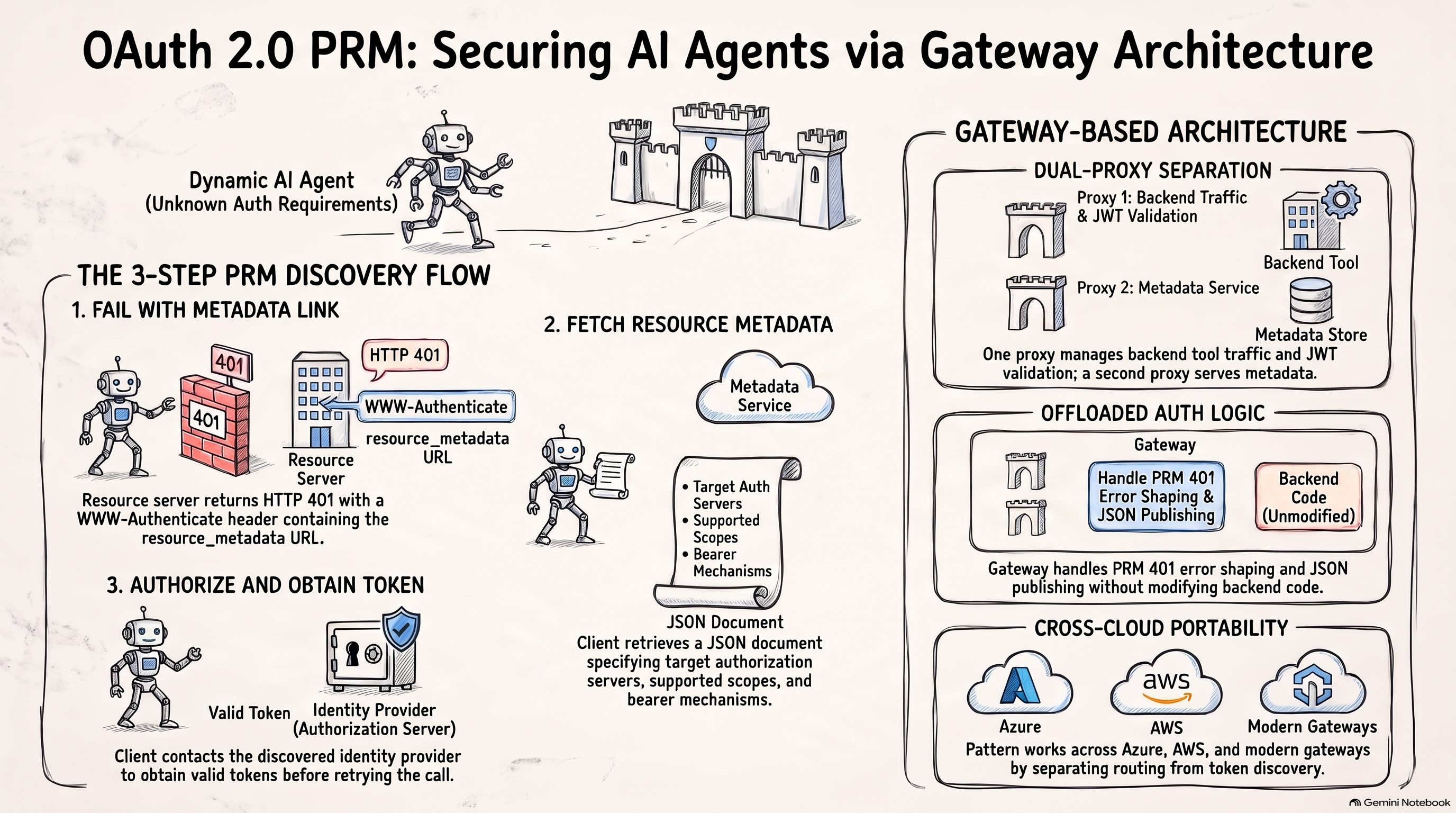
PRM is now published as RFC 9728. The flow is simple—three steps:
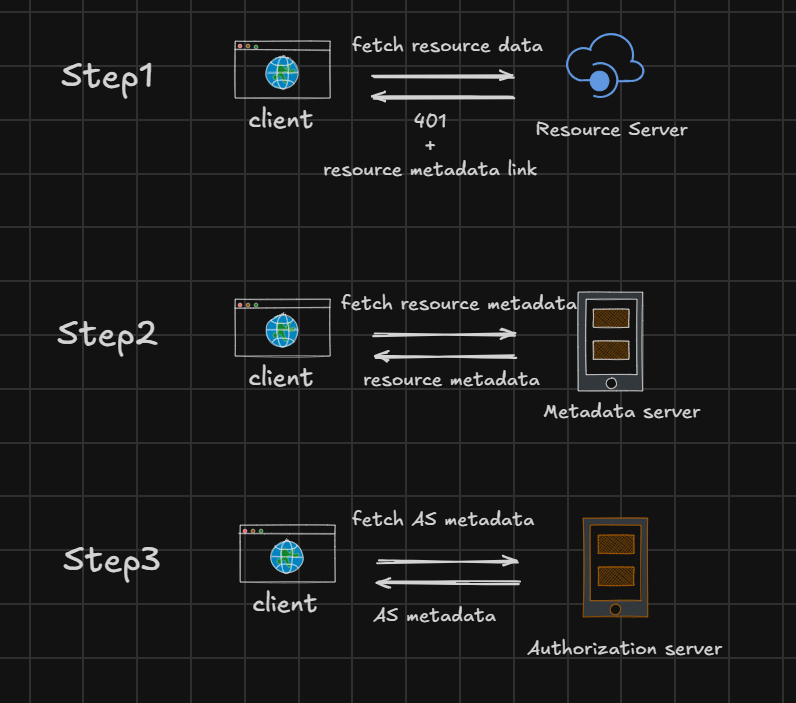
Step 1: The client tries to fetch data from the resource server. With the wrong token, the request fails with 401 Unauthorized. Critically, the resource server must also return a URL where the client can discover authorization metadata for that resource. A typical response looks like this:
1 | 401 Unauthorized |
Step 2: The client retrieves the resource metadata from that URL. For example:
1 | { |
This JSON is all OAuth-related: the authorization server URL is the piece clients care about most. You may also see supported scopes, signing algorithms, and more.
Step 3: The client calls the authorization server (or its discovery document) to learn endpoints, supported flows, and how to obtain tokens:
1 | GET https://oauth-authorization-server/.well-known/idp |
With that information, the client can start the appropriate OAuth flow and get a valid token. Everything after that is outside PRM itself—but PRM is what tells the client where to start.
One note: PRM was not invented only for AI agents. It fits any similar scenario; agents simply made the need more urgent.
A Gateway-Based Implementation
As we saw above, PRM is not complicated. Most of the work sits on the resource server side—not the authorization server—and you control the resource server, so adoption is practical.
You can bake PRM behavior directly into your data service. In this article, I will share a Gateway-based approach that is lighter on your MCP code and easier to extend. Let’s look at it step by step.
Scenario
Imagine you built an MCP server, exposed it for agents to consume, and implemented basic token validation inside the MCP app. Your next goal: support RFC 9728 PRM without turning the MCP codebase into an OAuth Swiss Army knife. How would you do that?
Architecture
My current implementation uses a few Azure building blocks:
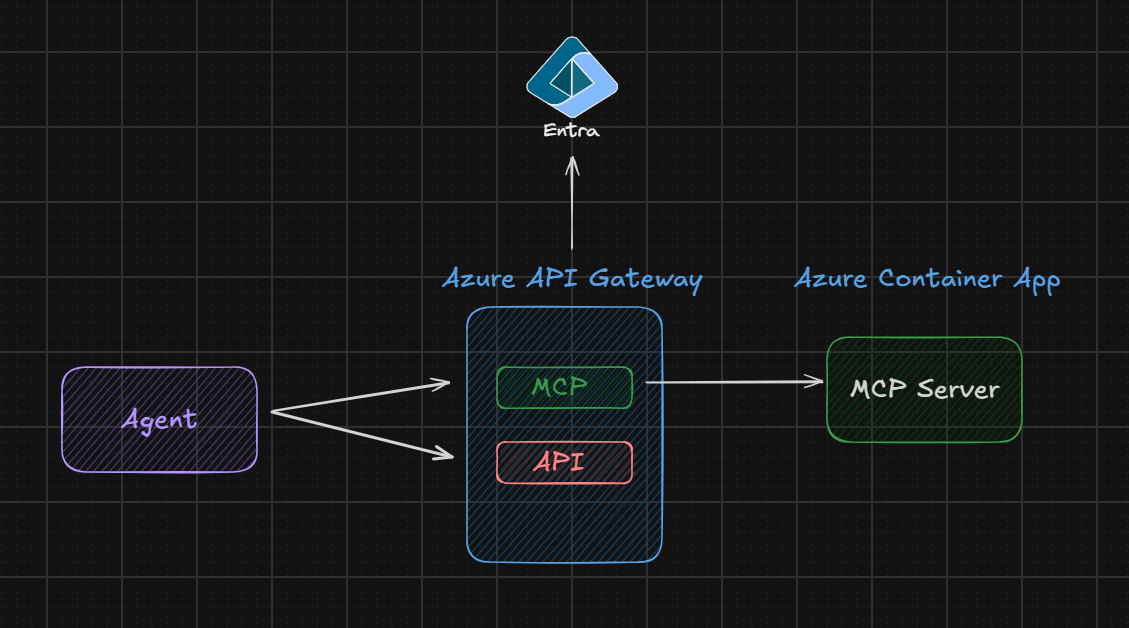
- Azure Container Apps (ACA): The real MCP server runs in a container on ACA. The internals of MCP are not the focus here—you can treat the backend as a black box for now.
- Azure Entra ID: Acts as the authorization server and issues tokens.
- API Gateway (Azure API Management): The star of the show. Through proxies and policies, the gateway adapts MCP for PRM. This is what we will configure in detail.
Gateway Policy Configuration
Azure API Management supports two relevant proxy types: standard API proxies for HTTP services, and MCP proxies for MCP workloads.
For this architecture you need two front doors: one MCP proxy and one API proxy.
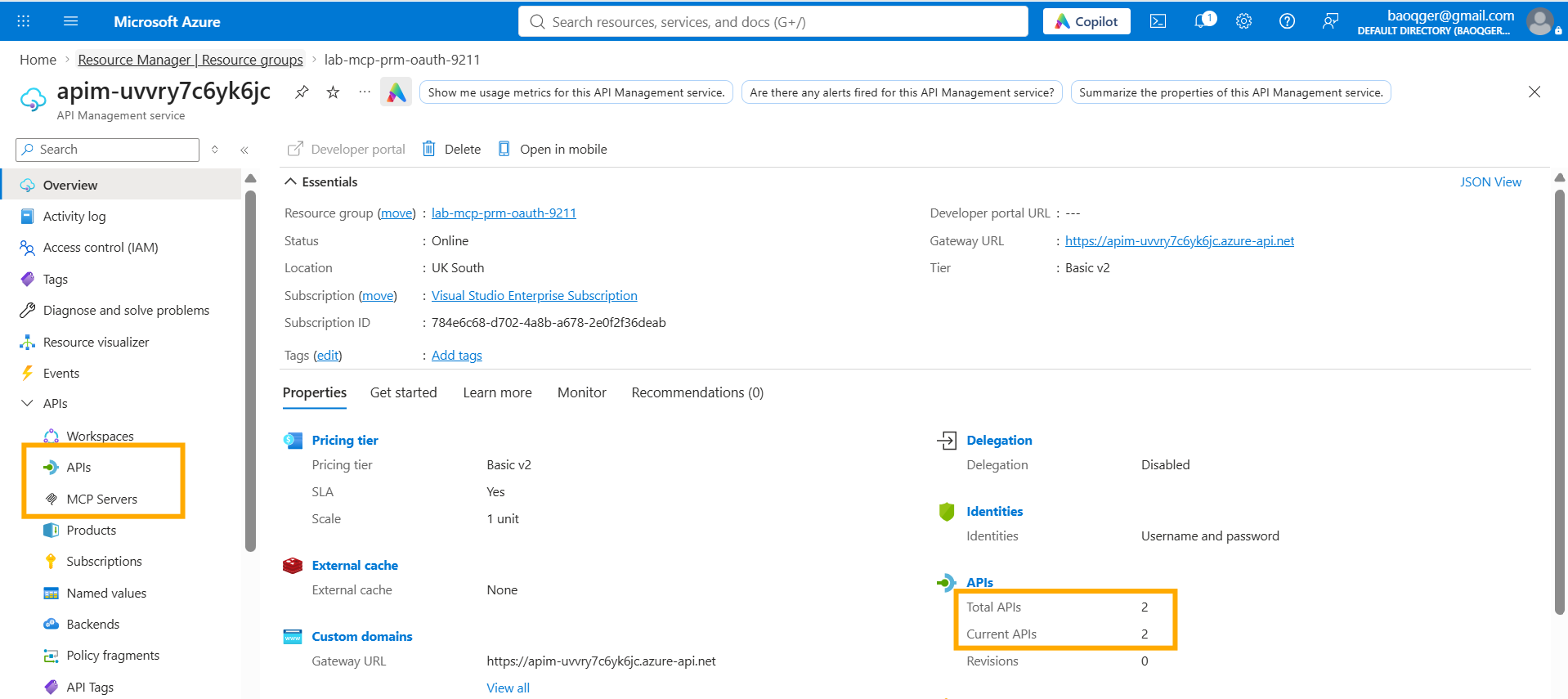
First, the MCP proxy. Its backend is the MCP service running on ACA:

The policy looks like this:
1 | <policies> |
The validate-azure-ad-token element performs token validation. You can tune the checks; here we validate the aud (audience) claim.
When validation fails, the on-error block shapes the response. The resource_metadata parameter in WWW-Authenticate tells the client where to fetch protected-resource metadata—PRM Step 1.
That URL is served by the second proxy on the gateway—an API route with no backend service; the metadata is returned entirely from policy:
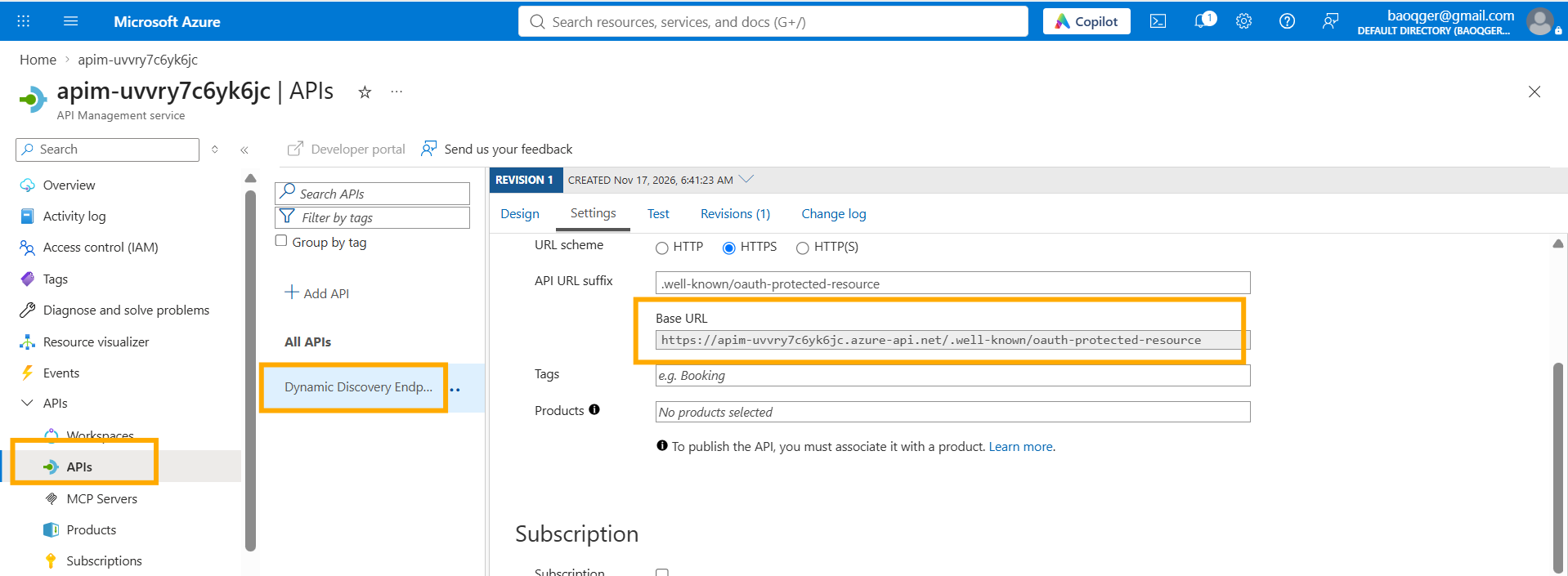
1 | <policies> |
This JSON exposes four important fields:
resource: The URL of the protected MCP endpoint this metadata describes.authorization_servers: Where tokens must come from—here,https://login.microsoftonline.com/...points to Entra ID.bearer_methods_supported: How the resource accepts bearer tokens (e.g. HTTP header).scopes_supported: The scopes clients should request.
That mapping is PRM Step 2. With this in hand, an agent (or any OAuth client) knows exactly which authorization server and scopes to use—and can call Entra ID to obtain a token.
Great, right? The MCP container keeps doing MCP; the gateway owns the OAuth discovery surface.
Portability
I used Azure in this walkthrough, but every major cloud offers some form of API gateway. The same pattern—MCP proxy for validation + metadata route for /.well-known—transfers cleanly. I plan to share a similar setup on AWS in a future article when I have cycles to document it.
Summary
- AI agents widen the set of resources a client might call, which makes cross–trust-domain token mistakes common.
- RFC 9728 PRM uses a
401+WWW-Authenticatehint, a metadata document, and authorization-server discovery so clients find the right IdP. - Putting PRM on API Management keeps your MCP service thin: one MCP proxy for JWT validation and error shaping, one API proxy for metadata—Step 1 and Step 2 without code changes in the backend.
If you are exposing MCP to agents in production, this gateway layer is a practical place to standardize auth. Smart design, right?