Entra Agent ID + Sidecar - A Practical Guide to Building Secure AI Agents
Background
In my previous article, I introduced Entra Agent ID, an identity management service designed specifically for AI agents, and walked through its conceptual model. The design can feel a little abstract, so in this article, let’s put it into practice and build a more secure cloud-based AI agent using Entra Agent ID and the Sidecar pattern.
OWASP Identity and Privilege Abuse
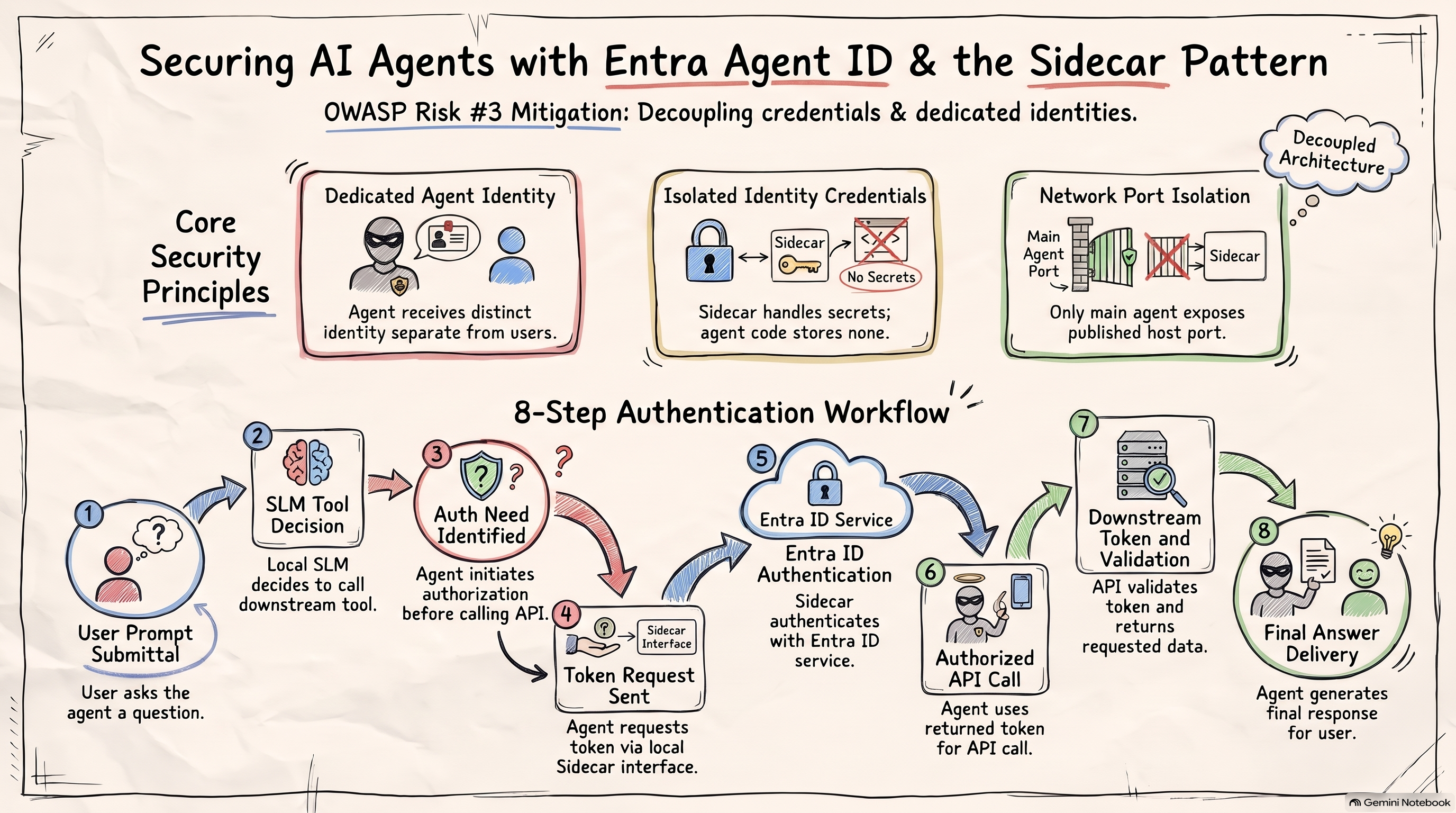
In 2026, OWASP published its Top 10 security risks for Agentic Applications. The third item, Identity and Privilege Abuse, addresses risks that arise when AI agents do not have their own identities and permission management. For example, an agent without a dedicated ID may have to use the user’s ID or the ID of its host application, making dedicated management and auditing difficult. Or, to support long-running agents, developers may store identity credentials directly in code, creating a risk of credential exposure.
OWASP recommends two practices to address this risk:
- Give every AI agent its own identity.
- Do not let agents store identity credentials directly.
As we discussed in the previous article, the Entra Agent ID model addresses both of these recommendations.
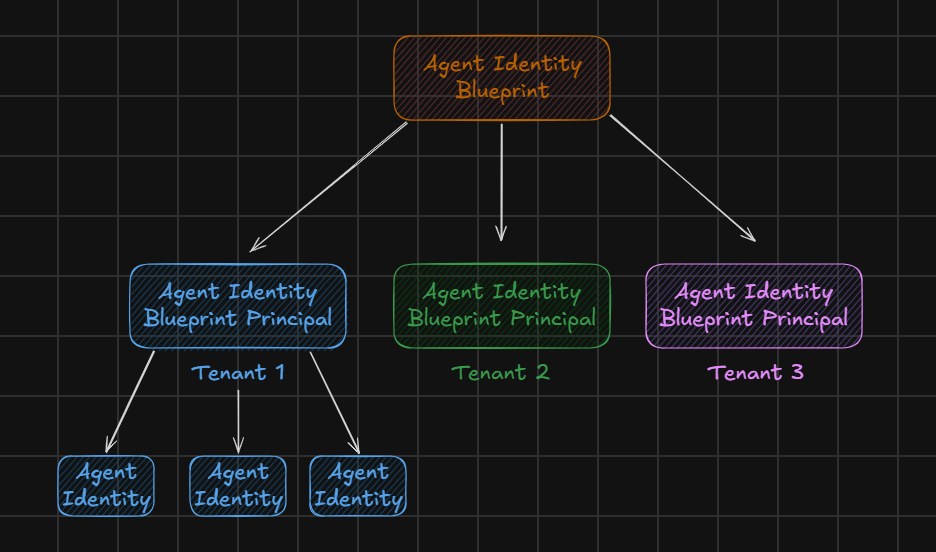
With that context in mind, let’s look at how to put the model into practice.
The Sidecar Pattern
This architecture uses the Sidecar pattern, a familiar approach in cloud-native applications. A Sidecar is a helper process that runs alongside an application and provides capabilities the application needs, while keeping that supporting logic separate from the application itself. The Sidecar and application communicate over a local network and share a lifecycle. Common uses include networking, logging and monitoring, and managing keys or certificates.
Our example follows the same pattern. As shown below, the architecture consists of four containers:
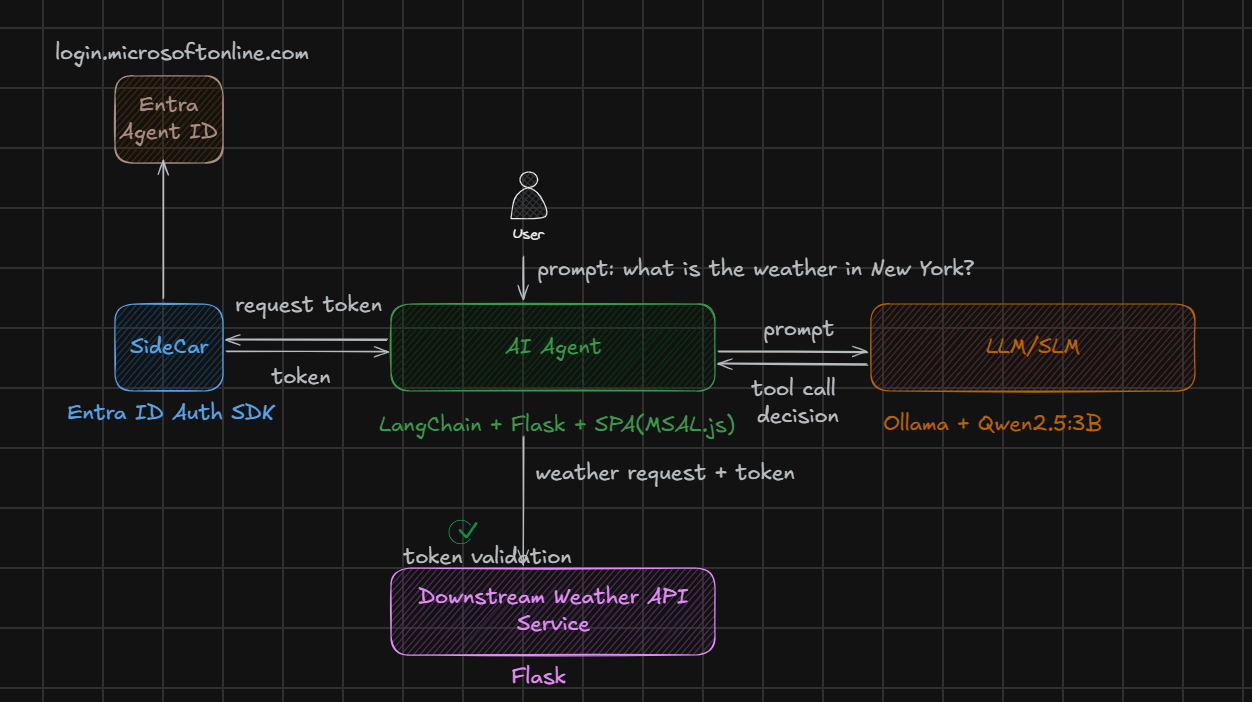
- AI agent: The main agent application, built here with LangChain and Flask.
- LLM/SLM: The generative AI model. You can use a large model in the cloud or a small model locally. This example uses Ollama with Qwen2.5:3B.
- Downstream API: A service exposed to the agent as a tool. Here, we use a weather API.
- Sidecar: This container communicates with Entra ID and handles authentication and token acquisition using the agent’s identity.
Here is how the workflow operates:
- The user asks the agent a question, such as, “What’s the weather like in New York?”
- The agent communicates with the local small language model, which decides whether to call the weather API tool.
- Before calling the weather API, the agent needs to authenticate and be authorized. The agent itself has no identity credentials or related authentication logic; the Sidecar handles those responsibilities.
- The agent requests a token through the Sidecar’s interface.
- The Sidecar is implemented using the
Entra ID Auth SDKand configured with Entra Agent ID information, such as the Blueprint, Agent Identity, and identity credentials. With this information, the Sidecar communicates with Entra ID’s identity and token service atlogin.microsoftonline.com, completes authentication and authorization, and returns a token to the agent. - The agent uses the token to call the weather API.
- The weather API validates the token and, if validation succeeds, returns the weather information.
- The agent uses that information to compose a final answer for the user.
That’s the overall flow. Next, let’s look at a few key implementation details and the security benefits they provide.
Security Details
A complete configuration for all four interconnected containers would be lengthy, so here are the most relevant parts of the setup:
1 | services: |
The agent and Weather API are implemented in my own code, so their container images need to be built locally first. Ollama and the Sidecar use publicly available images.

The most distinctive part of this architecture is the Sidecar container. It uses Microsoft’s publicly available mcr.microsoft.com/entra-sdk/auth-sidecar image. The implementation is open source and built on the microsoft-identity-web project, which is worth exploring if you’d like to learn more about the details.
You can find the complete project setup on my GitHub: https://github.com/baoqger/entra-agent-id-security-lab
The full project is fairly large and complex, so I can’t cover every detail here. Instead, let’s focus on a few security details and see how the implementation follows the OWASP best practices we discussed above.
A Dedicated Identity
Entra Agent ID gives each agent a dedicated identity, distinct from user IDs and regular application IDs, and manages it separately. This is the foundation of the approach.
As you can see in the configuration above, the llm-agent environment variables associate the Entra Agent ID definition with the agent running in the container.
1 | llm-agent: |
The Agent Does Not Store Secrets
The identity credentials required for authentication and authorization with Entra ID are isolated from the agent container and held by the Sidecar. This way, a compromise of the agent itself does not directly expose those credentials.
1 | sidecar: |
Network Ports
As shown in the configuration, the agent exposes a network port so users can interact with it. The other containers, including the Sidecar, do not publish host ports, so they communicate through the shared network.
Summary
In this article, I showed how to build a secure cloud-based AI agent architecture using Entra Agent ID and the Sidecar pattern. In future articles, I’ll continue exploring this topic, including cloud deployment and additional agent authorization flows. Stay tuned!