GenAI Cost Runaway? Observable Token Quota Control with Azure AI Gateway
Background
In this note, I’ll continue exploring one of the core capabilities of Azure AI Gateway: token-based rate limiting.
The hands-on setup is straightforward but very practical: I deploy a DeepSeek-R1 model on Microsoft Foundry, then integrate its online inference endpoint into Azure API Management (APIM). With APIM policies, we can enforce rate limits based on token consumption, so the “GenAI bill” doesn’t spiral out of control. Along the way, this is also a great way to revisit classic APIM concepts and apply them to modern GenAI workloads.
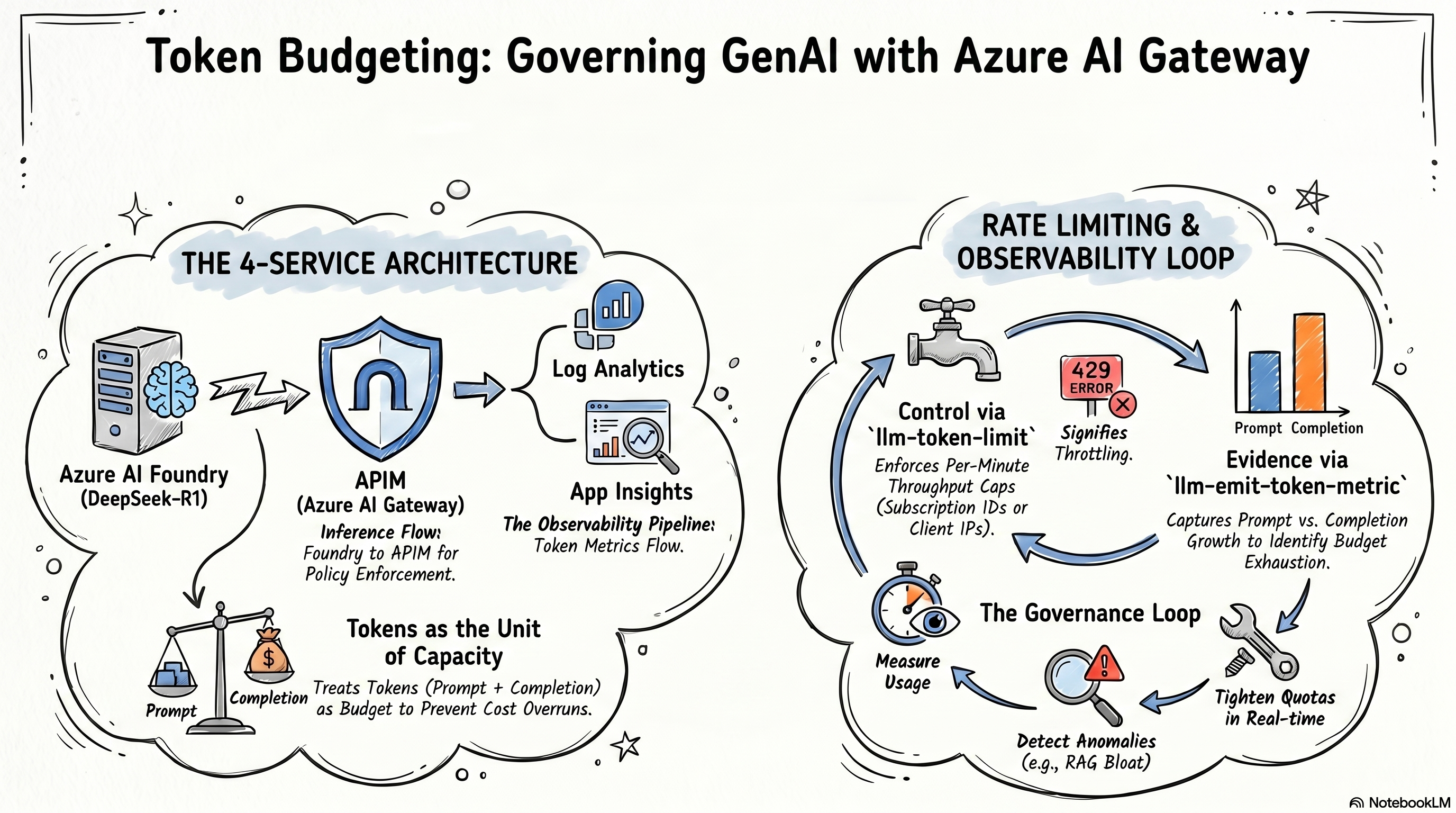
Why token-based rate limiting matters more for GenAI
For GenAI applications, rate limiting is not just about “getting an occasional 429 and retrying.” It directly affects:
- User experience: users can feel the latency or failures immediately when limits kick in
- Cost control: cost is strongly correlated with token usage; uncontrolled growth becomes expensive quickly
- System stability: token throughput spikes amplify pressure on upstream/downstream components (model capacity, gateway, logging pipeline, cache, etc.)
Compared to traditional APIs—where we typically limit by request rate (RPS/RPM) and burst traffic—GenAI rate limiting is often more nuanced:
- Platforms may limit both request count and token throughput
- Many platforms track prompt tokens and completion tokens separately
- Some platforms apply separate quotas for different modalities (text vs image vs audio)
That leads to an important reality: two requests are not equal in GenAI. The longer the context, the more content you stuff from RAG, the more complex your tool/function schema, and the longer the model’s answer, the faster tokens can explode. As a result:
- You might be under the request limit but still get throttled because
tokens-per-minuteis exhausted - Or the other way around
Demo environment and services
To demonstrate token-based throttling, I set up a small lab environment with these Azure services:
Azure API Management (APIM): exposes a unified API endpoint and hosts the throttling policiesAzure Foundry: deploys DeepSeek-R1 and provides an online inference endpointLog Analytics: the storage layer for token-related logs/metricsApplication Insights: built on top of the Log Analytics workspace for querying and visualization
Architecture: the rate-limit design
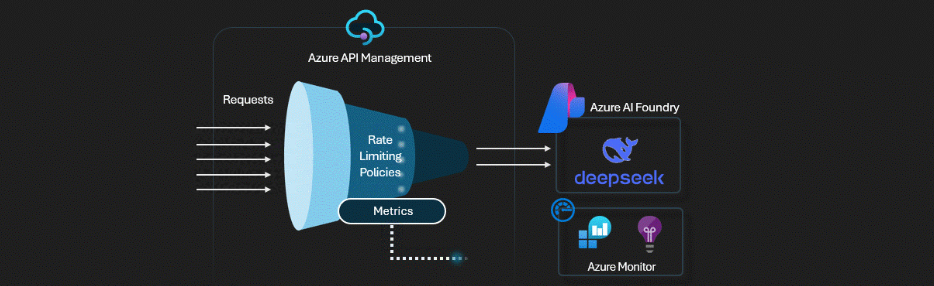
The overall flow looks like this:
Azure Foundry: deploy DeepSeek-R1 and expose its online inference endpointAPIM:- create a
backendthat points to the DeepSeek-R1 inference endpoint - create an
apithat wraps the backend, and expose it to end users and AI agents - implement and enforce rate-limit policies at the gateway layer
- create a
Log Analytics: create a workspace to store token consumption dataApplication Insights: create an App Insights instance backed by the workspace for querying and dashboards
Deploying the DeepSeek-R1 model
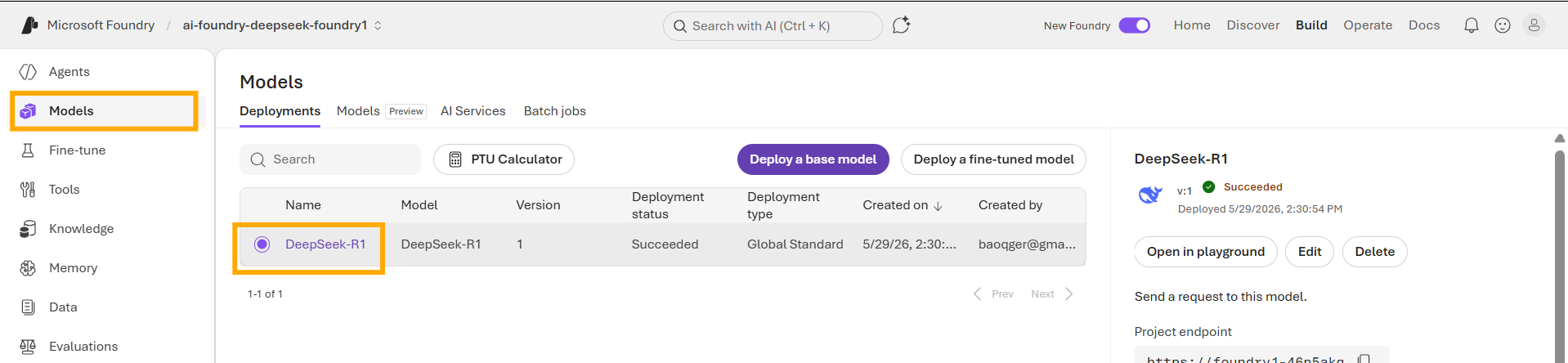
Here is the DeepSeek-R1 deployment in Foundry:
Integrating APIM
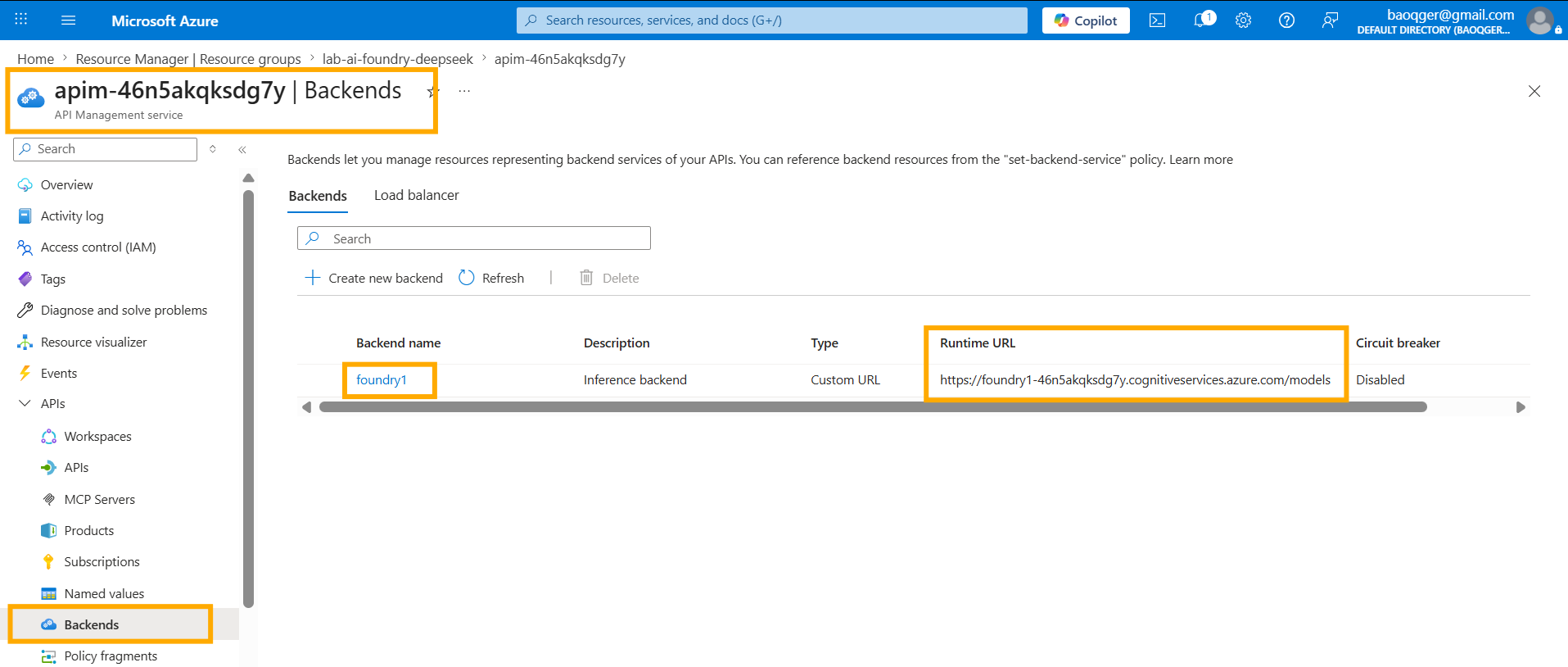
After DeepSeek-R1 is deployed to Foundry, it exposes an inference endpoint. In APIM, I wrap it as a backend named foundry1:
Then I create an API named Inference API:
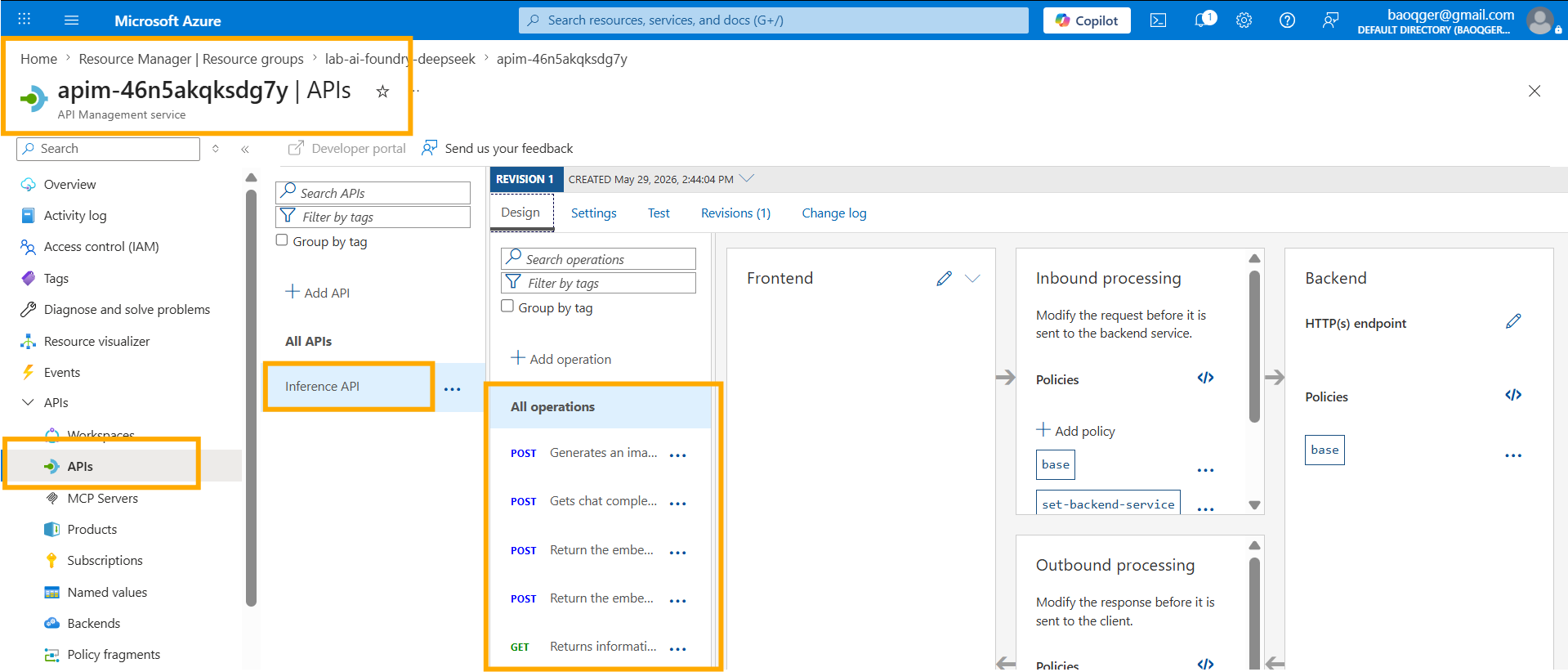
And bind it to the backend with the following policy snippet:
1 | <set-backend-service backend-id="foundry1" /> |
This lab environment has quite a few moving parts, so I won’t expand every detail here. If you want the full working project, you can check my GitHub repo: azure-ai-gateway-labs.
Next, let’s focus on the key part: the rate-limit policy.
Rate-limit policies
The policy configuration looks like this:
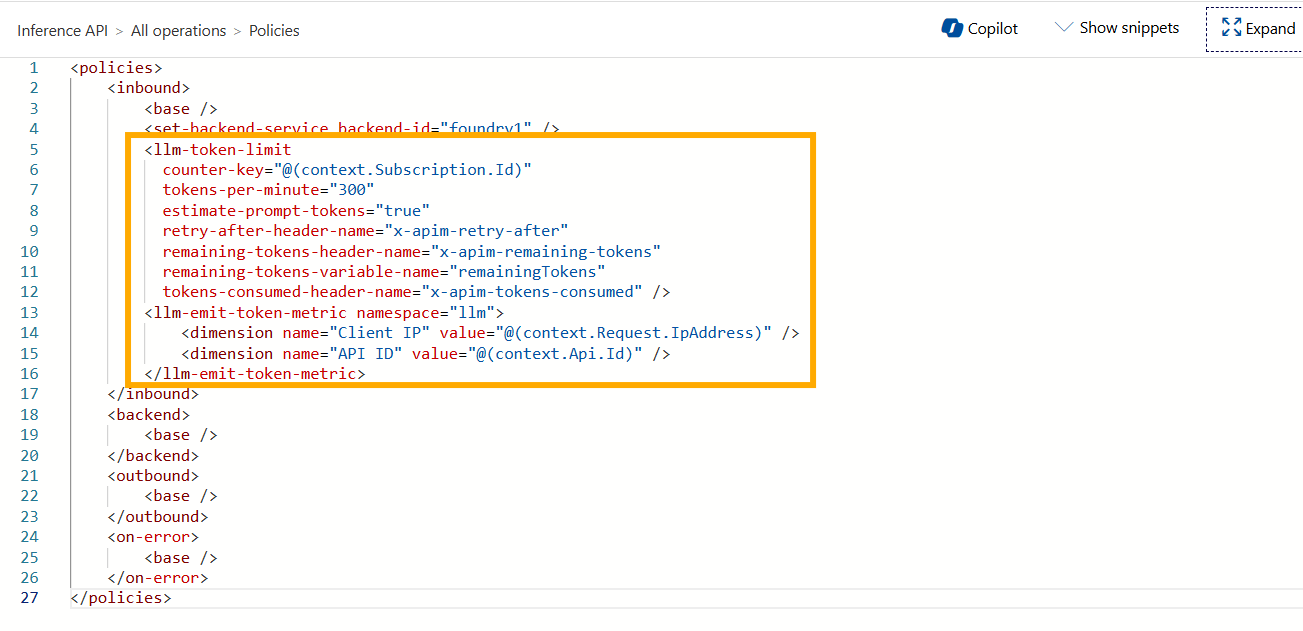
In APIM, the two policies most relevant to token rate limiting are:
llm-token-limit: enforce token-based throttlingllm-emit-token-metric: emit token usage metrics (for logs/observability)
llm-token-limit: key configuration points
Here are the settings worth paying attention to:
counter-key: the dimension used for token accounting. In this lab, I usesubscription.Id.subscriptionis an APIM concept for managing API access; clients can be required to include a subscription key (also commonly used as a lightweight security gate)- by extracting subscription info from the request, we can account and throttle per subscription
- alternatively, you can throttle by client IP, e.g.
Request.IpAddress
tokens-per-minute: the core threshold, i.e. how many tokens are allowed per minute- you can also use
token-quota+token-quota-periodfor more flexible quota periods (hour/day/month/year)
- you can also use
estimate-prompt-tokens: whether to estimate tokens (prediction) or rely on the model’susagereturned from responses- when enabled, throttling may kick in more aggressively as you approach the limit
- when disabled, it tends to be more conservative and accounts for actual consumption
remaining-tokens-header-name,tokens-consumed-header-name: write remaining/consumed tokens into response headers for debugging (the demo makes this very obvious)
llm-emit-token-metric: observability and dimensions
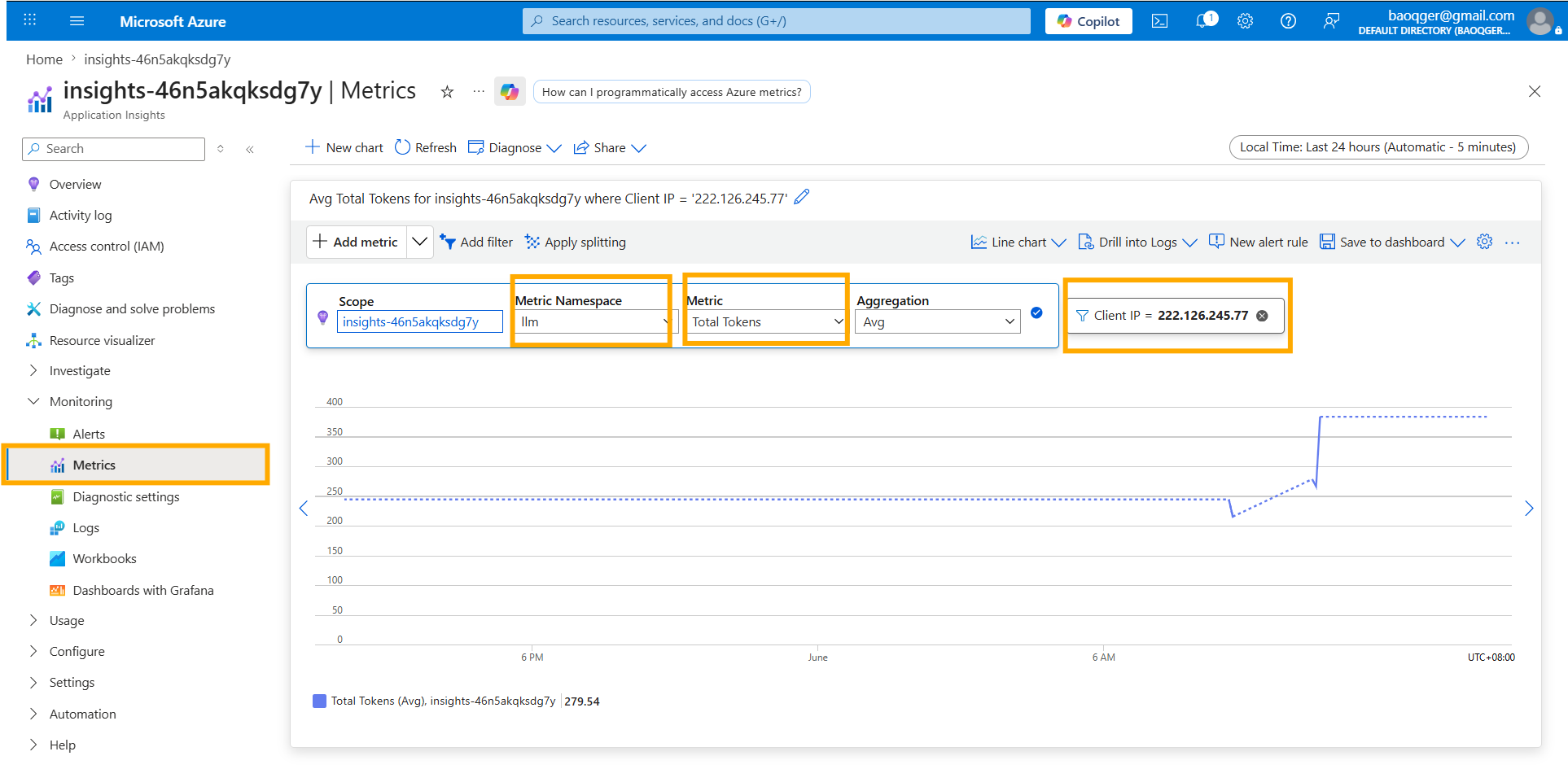
llm-emit-token-metric collects token usage and sends it into an Application Insights custom namespace called llm.
Common metrics include:
prompt tokens: input token countcompletion tokens: output token counttotal tokens: total consumption (sum of the two)
In addition, I attach two custom dimensions (tags) to each metric event: Client IP and API ID. This enables deeper filtering and analysis, for example:
Demo
Now let’s run a quick demo. The script below calls the APIM-wrapped DeepSeek-R1 inference endpoint 10 times and prints key response info so we can observe throttling behavior.
Note: variables like
apim_resource_gateway_url,inference_api_path,inference_api_version,models_config, andapim_subscriptionscome from your environment configuration. I keep them as-is.
1 | import json |
The output below is the key observation. Since the limit is set to tokens-per-minute: 300:
- Run #1 consumes 258 tokens, leaving 42 remaining
- Run #2 still succeeds, but the remaining tokens drop to 0
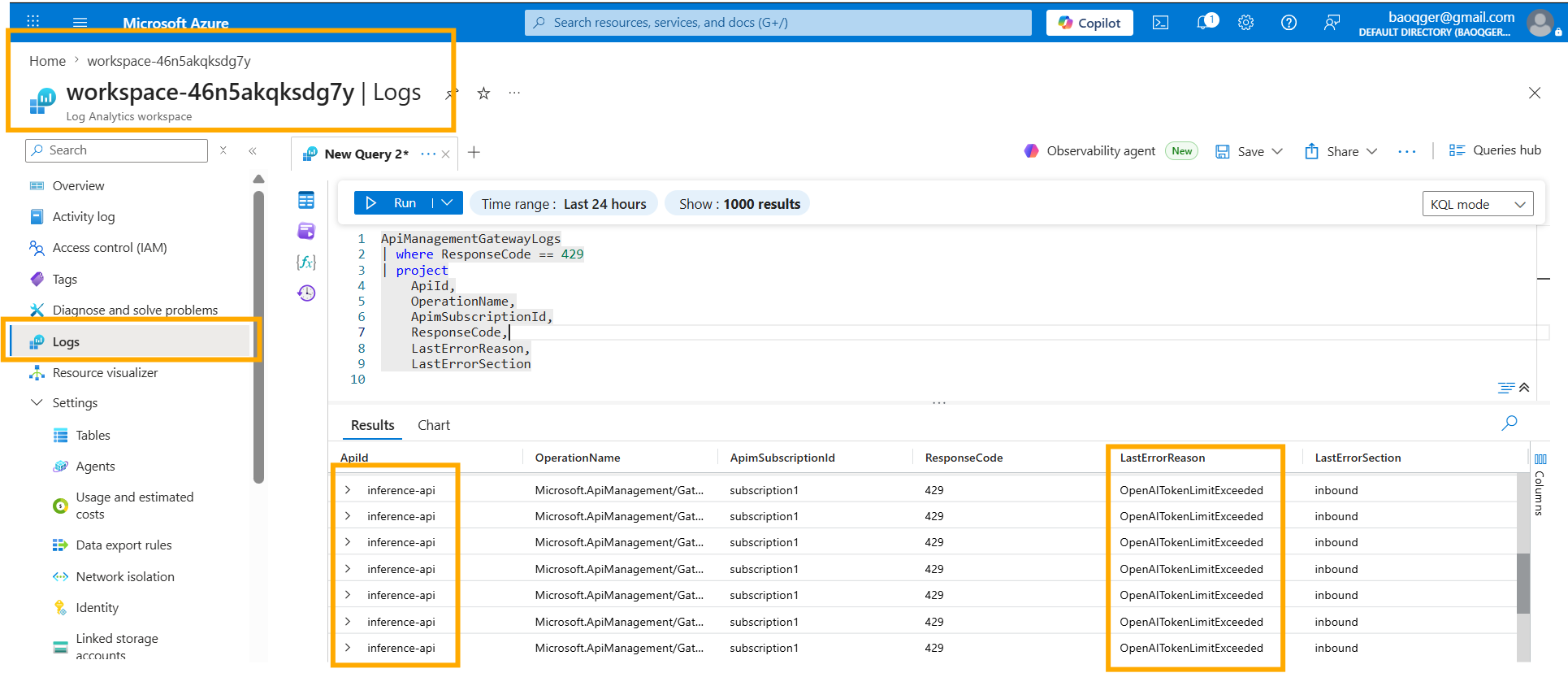
- Subsequent runs get throttled with HTTP 429, and
x-apim-retry-aftertells you how long to wait before retrying
1 | ▶️ Run: 1 status code: 200 ✅ input tokens: 25 output tokens: 233 total tokens: 258 headers: {'x-apim-remaining-tokens': '42', 'x-apim-tokens-consumed': '258'} |
We can also validate this from logs:
Summary
In GenAI systems, token-based throttling is often more aligned with real resource consumption than request-count throttling. By using APIM’s llm-token-limit for quota enforcement and pairing it with llm-emit-token-metric to push token metrics into Application Insights / Log Analytics, we can manage cost, user experience, and stability under a single observable control plane.
In coming notes, I’d like to dig further into practical topics such as: designing quota tiers per subscription, handling burst traffic more gracefully, and building dashboards/alerts based on token usage. Great, right?